

Question types
See the nine answer formats in a Static Survey, with examples and the controls you will find in the question editor.
Each question in a Static Survey has an answer type. The type controls what participants can enter: text, a choice, a number, or a date. You select it in the Questions step of the builder.
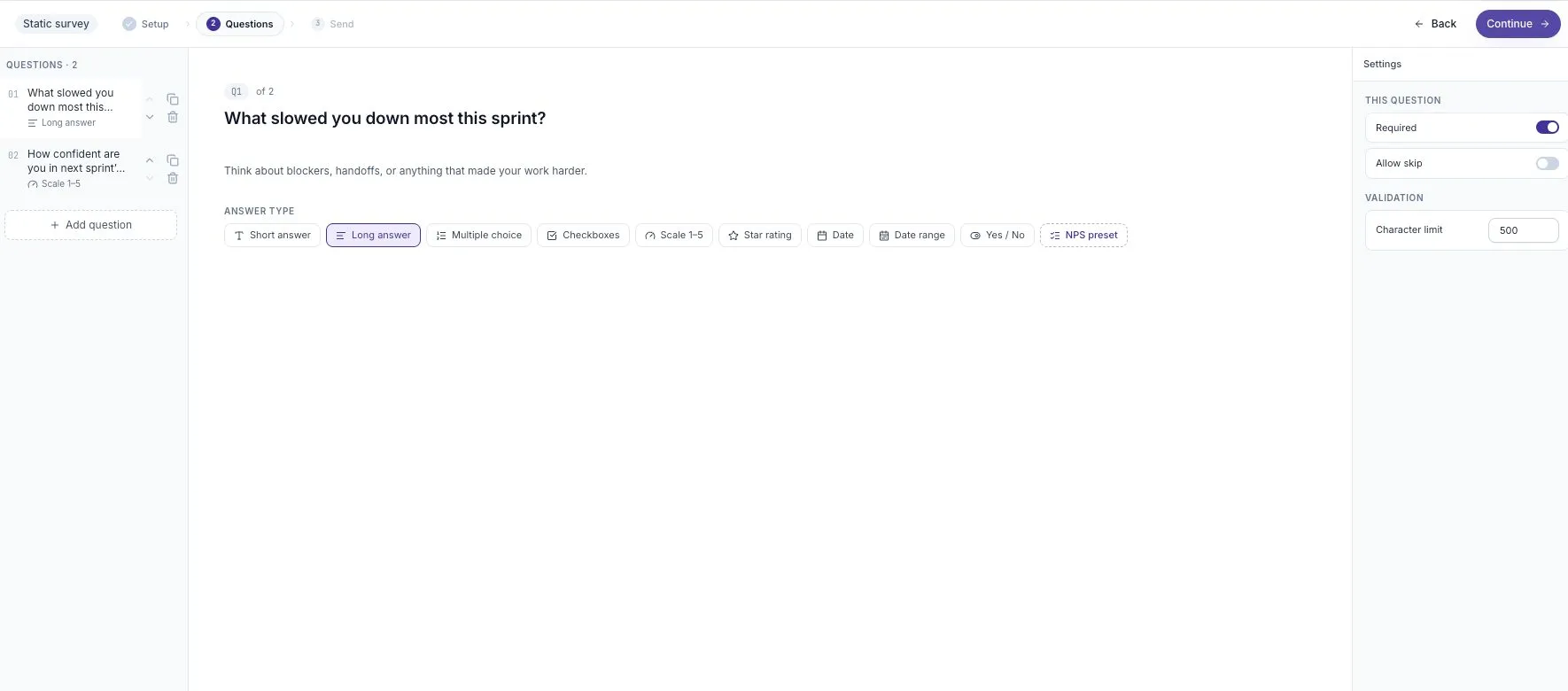
Select a question on the left. Its answer type and settings appear in the editor.
Available answer types
Section titled “Available answer types”These are the labels shown in the builder. Some exports and technical references use shorter names, such as Choice or Rating.
| Builder label | What participants enter | Example question |
|---|---|---|
| Short answer | A short text response | What project are you working on? |
| Long answer | A longer text response | What slowed you down most this sprint? |
| Multiple choice | One option from a list | Which stage needs the most attention? |
| Checkboxes | More than one option | Which tools did you use this week? |
| Scale 1–5 | A number on a scale | How confident are you in next sprint’s plan? |
| Star rating | A rating shown as stars | How useful was the workshop? |
| Yes / No | One of two answers | Did you have the information you needed? |
| Date | One date | When did the project start? |
| Date range | A start date and an end date | Which dates does this feedback cover? |
Multiple choice and Checkboxes have different meanings. Use Multiple choice when a participant must pick one answer. Use Checkboxes when several answers can apply to the same person.
Text and helper text
Section titled “Text and helper text”The Question text is the question participants answer. Helper text adds a short instruction underneath it.
For example:
- Question: “What slowed you down most this sprint?”
- Helper text: “Think about blockers, handoffs, or anything that made your work harder.”
Text questions also show a Character limit in the settings panel. Check that the limit leaves enough room for the answer you are asking for. A request for a detailed example needs more space than a project name.
Required and Allow skip
Section titled “Required and Allow skip”The settings panel includes Required and Allow skip. Review these for each question before publishing. They describe whether an answer is expected and whether a participant can move past the question.
Do not make a question required if some people cannot reasonably answer it. For a question about a specific project, include a suitable choice such as “I did not work on this project” when that is relevant.
The NPS preset
Section titled “The NPS preset”NPS preset configures a Scale question from 0 to 10 with endpoint labels. It is a shortcut for setting up a question, not a tenth answer type.
The usual NPS question asks how likely someone is to recommend something. Keep that meaning and the 0–10 scale if you intend to interpret the result as NPS. A general satisfaction question using different wording is not automatically an NPS measure.
Switching types without losing work
Section titled “Switching types without losing work”Related formats can carry their settings across:
| Change | Content retained |
|---|---|
| Multiple choice ↔ Checkboxes | The answer options |
| Scale ↔ Star rating | The configured bounds |
Switching between unrelated formats resets settings that no longer apply. After changing a type, review the question text, options, and required setting before moving on.
Editing after publication
Section titled “Editing after publication”Published survey questions are locked. To change the question set, use Survey actions → Duplicate survey, then edit the new draft. This keeps answers collected under one question set separate from answers collected under another.
See Manage a survey’s lifecycle for the difference between duplicating, closing, and archiving a survey.
Related guides
Section titled “Related guides”- Write useful survey questions — choose wording and formats that people can answer.
- Your first survey — build a complete two-question example.
- Agent Surveys — use an adaptive interview when you need follow-up questions.