

Cards, columns, votes, and comments
Reference for the four objects a retro board is made of — what each one holds, who can change it, and how each behaves in the interface.
The four objects on a retro board and their exact behaviour.
Columns
Section titled “Columns”Columns are the board’s lanes. They come from the format the board was created from and are written once, when the board is created.
| Property | Value |
|---|---|
| Title | From the format; editable on an active board |
| Colour | From the format; shown as the header dot and used in summary bars |
| Hint | Optional prompt line from the format, shown under the header only while the viewer can add cards |
| Order | Fixed at creation, from the format |
| Card count | Badge in the header, live |
On an active board, the retro’s creator or its current facilitator can change the column set:
- Rename a column — select the column title, edit it, then press Enter or click away.
- Add a column — use the add-column control at the end of the lanes.
- Remove a column — open the column’s menu and confirm. The last remaining column cannot be removed, and neither can a column that still has cards in it.
Two things stay fixed: columns cannot be reordered — there is no reorder control, and dragging a column does nothing — and the header dot’s colour cannot be changed from the board; it comes from the format.
Below 780px wide the lanes become a horizontal carousel, one lane at a time; from 780px up they render as a grid — three columns for formats with three or fewer lanes, four for wider formats, with the rest wrapping.
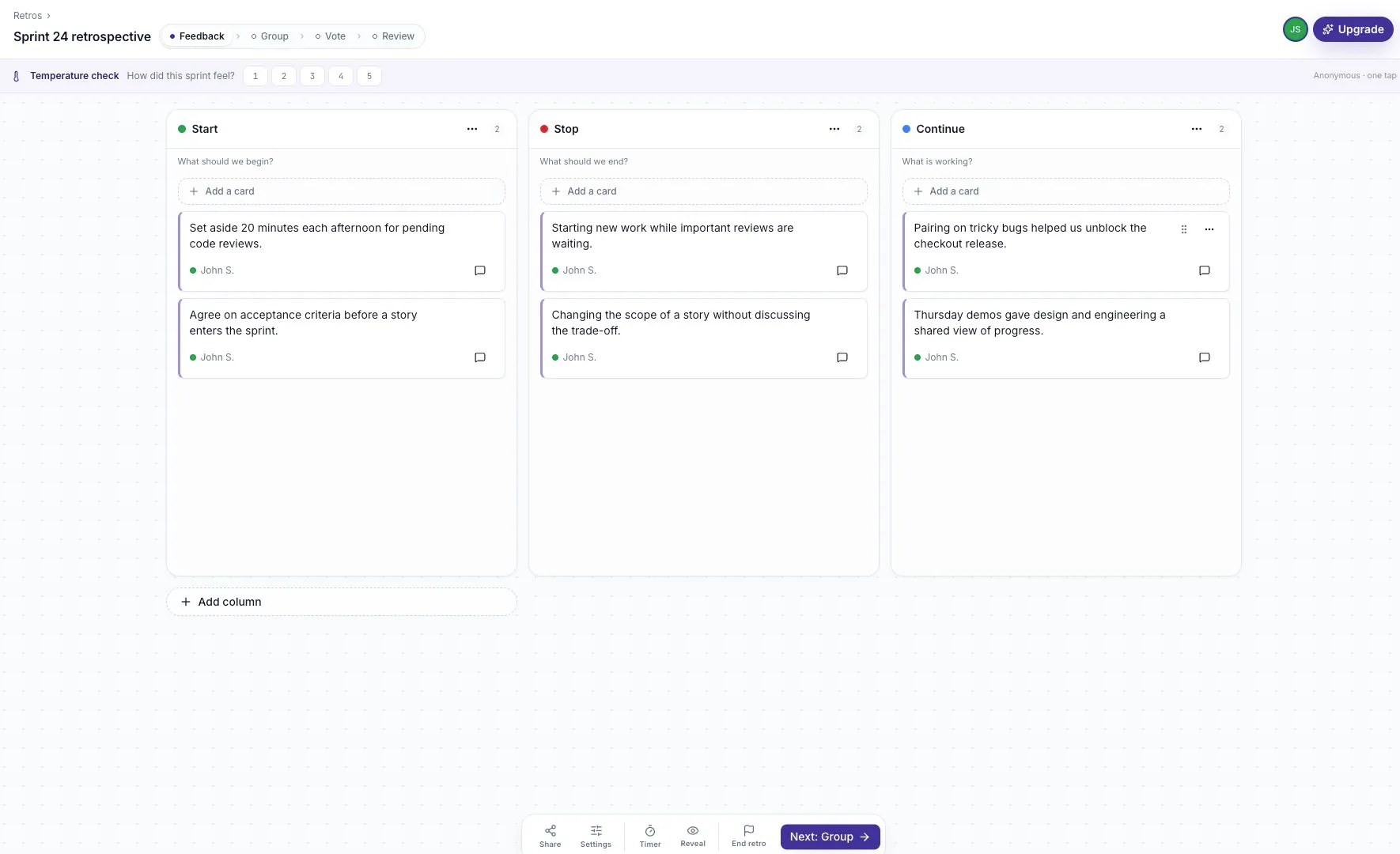
A card is one piece of feedback in one column.
| Property | Value |
|---|---|
| Text | Free text, multi-line |
| Author | Shown as First L.; Anonymous in italic on an anonymous board |
| Column | Set on creation, changed by dragging |
| Position | Set by drag order within the column |
| Votes | Total dot votes across everyone, plus your own count |
| Comments | Inline thread, collapsed by default |
| Theme | Optional manual or AI-created group — see AI theme clustering |
Who can do what
Section titled “Who can do what”| Action | Who |
|---|---|
| Add | Anyone who can write cards — Feedback phase on a guided board, any time on a Live board |
| Edit | The card’s author, or the facilitator |
| Delete | The card’s author, or the facilitator |
| Drag | The card’s author, or the facilitator |
| Vote, comment | Anyone on the board |
Your own cards carry an indigo left border.
Composing
Section titled “Composing”| Key | Effect |
|---|---|
Enter | Post the card; the composer stays open for the next one |
Shift + Enter | New line within the card |
Escape | Close the composer and discard the draft |
An unsent draft is held per column for the session, so a phase change that closes the composer does not lose what was typed. Editing an existing card follows the same keys, with Escape cancelling the edit.
Empty and whitespace-only submissions are ignored.
Text rendering
Section titled “Text rendering”Card text is rendered as text. Markdown and HTML are not interpreted.
| Content | Rendered as |
|---|---|
http:// or https:// URL | A link, opening in a new tab |
URL ending .gif .png .jpg .jpeg .webp | An inline image, up to 240px tall, linking to the source |
URL on media*.giphy.com, i.giphy.com, media.tenor.com, c.tenor.com | An inline image, as above |
| An image URL that fails to load | Falls back to a plain link |
Trailing sentence punctuation is not treated as part of a URL. There is no image picker or GIF search — inline media comes from pasting a URL.
Hidden cards
Section titled “Hidden cards”While a board is private and unrevealed, another participant’s card renders as a bordered placeholder reading Feedback hidden until reveal, with no text, author, or controls. The other cards become readable after reveal; author names depend on the board’s anonymity setting. See Private feedback and anonymity.
Dot votes are the board’s prioritisation mechanism.
| Property | Value |
|---|---|
| Budget | Per participant, per board. Default 5, range 0–99 |
| Set by | Facilitator, in Settings → Votes per person |
| Votes per card | Unlimited within your budget |
| Cast during | Vote phase on a guided board; any time on a Live board |
| Withdraw | The ▬ control beside a card you have voted on |
The remaining-budget pill in the top bar renders one dot per vote — filled for remaining, dimmed for spent — for budgets of 10 or fewer; larger budgets show the count as text. The pill is present only while votes can be cast, and never on a closed board.
Vote totals are hidden during guided Feedback. With Blind voting on, they also stay hidden during Vote and appear in Review. On an anonymous board, who cast a vote is never sent to other participants.
Comments
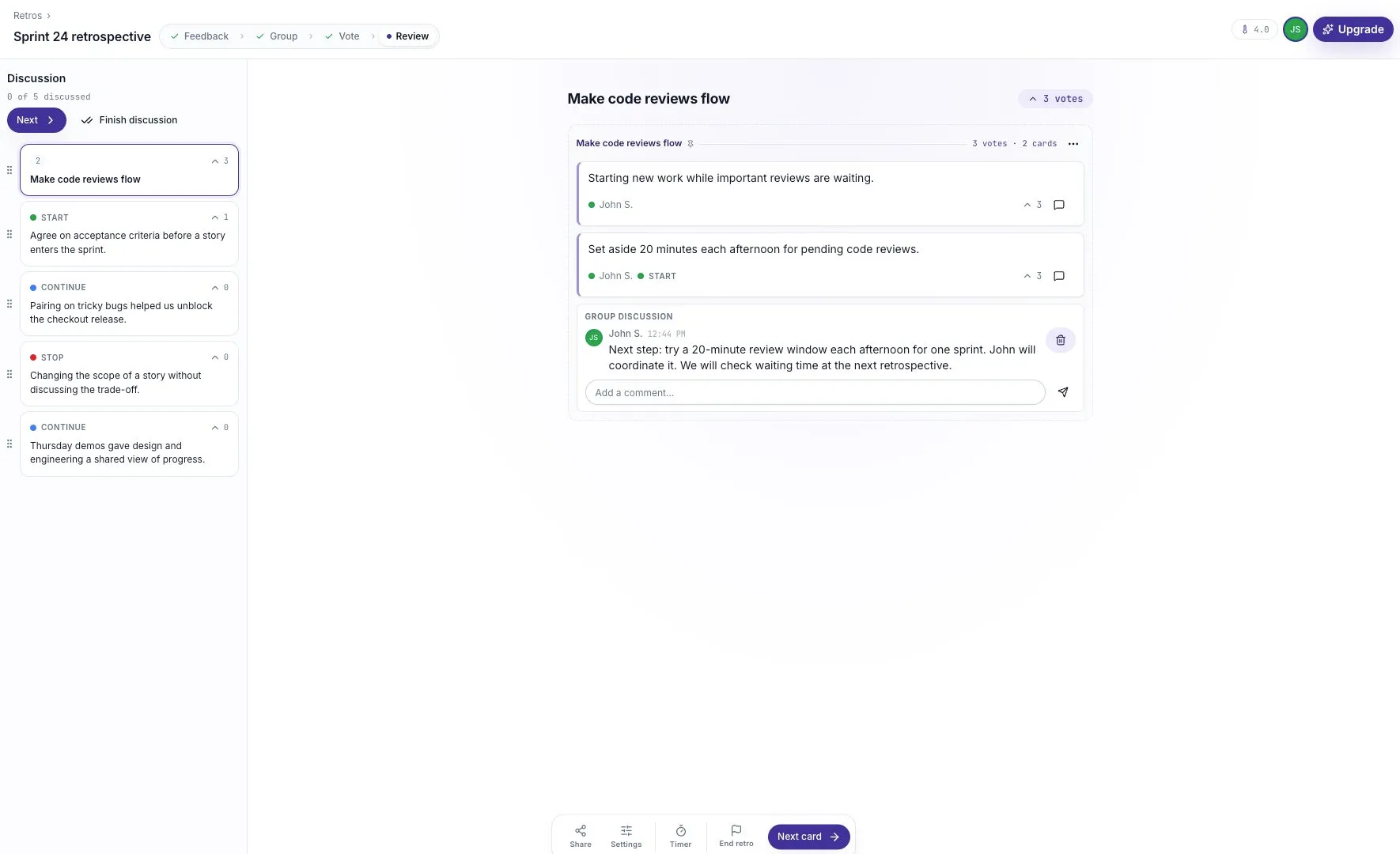
Section titled “Comments”Comments are a thread on a single card, shown inline on the board and in the panel under the Review spotlight.
| Property | Value |
|---|---|
| Author | Same display rule as cards |
| Timestamp | Time of day for the same day (2:41 PM), short date after that (Jul 7) |
| Post | Enter; Escape clears the draft |
| Delete | The comment’s author, or the facilitator |
| Count | Shown on the card’s comment control when above zero |
Comments on another participant’s card are withheld while the board is private and unrevealed, on the same terms as the card itself.
What a closed board keeps
Section titled “What a closed board keeps”Ending a retro freezes all four objects. Cards, votes, and comments remain readable and exportable; participants cannot add, edit, delete, vote, or comment. See Closing a retro.