

Automations
Build When/Then rules that pair a condition on your signals or integration metrics with an action — from a template, from a plain-English description, or from scratch.
An automation rule pairs conditions with actions: when morale drops below 60, then send a high-urgency alert. Open Automations directly.
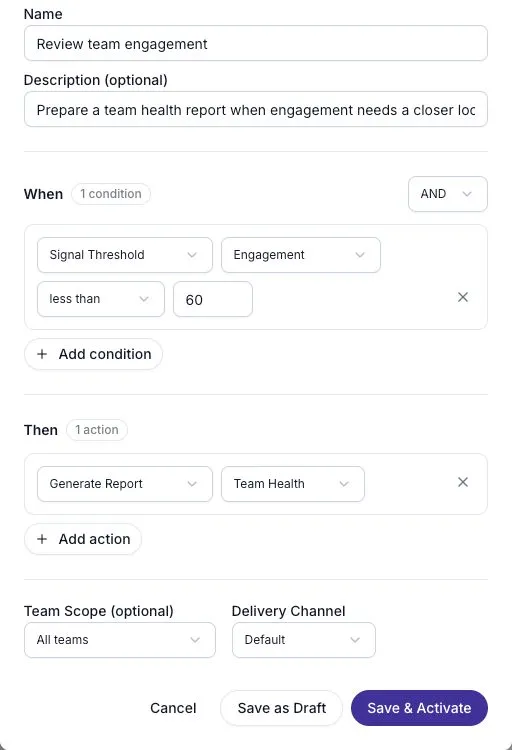
Every rule has the same anatomy — a name, one or more conditions combined with AND or OR, one or more actions, an optional team scope, and a delivery channel. There are three ways to get one.
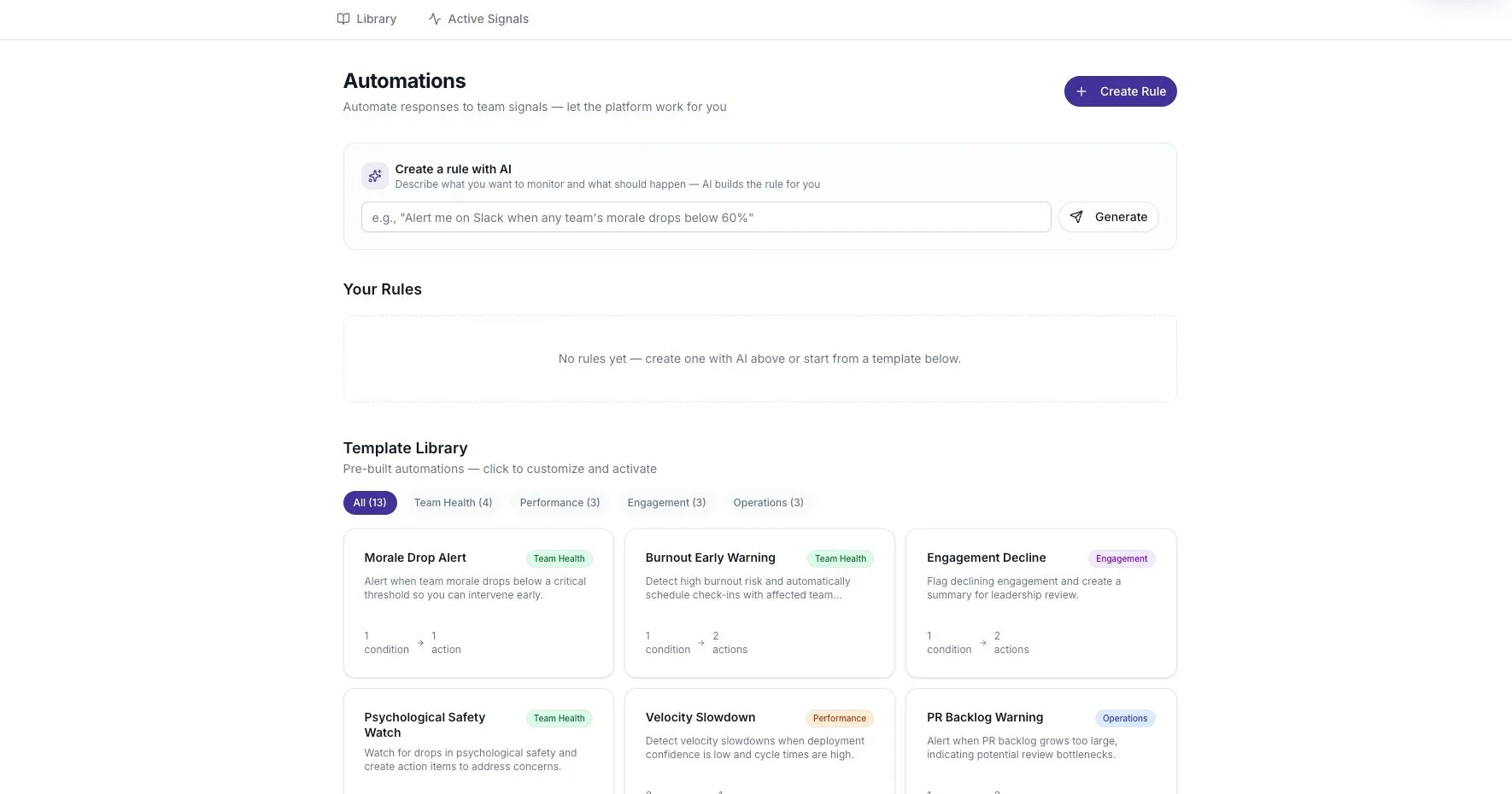
Start from a template
Section titled “Start from a template”Thirteen pre-built templates cover the common cases. This is the fastest way to a working rule and the best way to see how conditions are meant to be shaped.
- Scroll to Template Library and filter by category — Team Health, Performance, Engagement, or Operations.
- Select a template. The rule form opens pre-filled with its conditions and actions.
- Adjust the thresholds to your numbers. The templates ship with plausible defaults, not your defaults.
- Save.
The templates:
| Template | Category | Condition | Action |
|---|---|---|---|
| Morale Drop Alert | Team Health | Morale Score less than 60 | Send Alert (high) |
| Burnout Early Warning | Team Health | Burnout Risk greater than 75 | Send Alert (high) + Schedule 1:1 |
| Team Health Report | Team Health | Morale Score less than 70 or Burnout Risk greater than 60 | Generate Report (team health) |
| Psychological Safety Watch | Team Health | Psychological Safety less than 55 | Send Alert (medium) + Create Action Item |
| Velocity Slowdown | Performance | Deployment Confidence less than 40 and Cycle Time greater than 5 | Generate Report (trend analysis) |
| Deploy Confidence Drop | Performance | Deployment Confidence less than 50 | Generate Report (team health) + Send Alert (medium) |
| Sprint Health Check | Performance | Deployment Confidence changes by 15 over 14 days | Generate Report (signal summary) |
| Engagement Decline | Engagement | Engagement less than 50 | Create Summary (team) + Flag for Review |
| Feedback Silence | Engagement | Feedback volume less than 10 | Create Summary (team) + Send Alert (medium) |
| Sentiment Shift Alert | Engagement | Morale Score changes by 20 over 7 days | Send Alert (high) + Create Action Item |
| PR Backlog Warning | Operations | PR Count greater than 20 | Send Alert (medium) + Flag for Review |
| High Issue Volume | Operations | Issue Count greater than 30 | Flag for Review + Send Alert (medium) |
| Weekly Signal Digest | Operations | Engagement at most 100 | Create Summary (organization) |
Describe it in plain English
Section titled “Describe it in plain English”- In Create a rule with AI, type what you want — for example,
Alert me on Slack when any team's morale drops below 60%. At least five characters. - Select Generate. The rule form opens and the description is parsed automatically.
- Review the conditions and actions the AI produced, adjust anything it got wrong, and save.
Review every field before saving. A generated rule can misunderstand your intended threshold, scope, or action.
Build one from scratch
Section titled “Build one from scratch”Select Create Rule and fill in the form directly.
- Name — up to 200 characters — and an optional description, up to 1,000.
- Under When, add conditions and pick AND or OR to combine them. The logic applies to the whole set, not per pair.
- Under Then, add actions.
- Set Team Scope — a specific team, or All teams.
- Set Delivery Channel — Default, Slack, or Email.
- Save.
Condition reference
Section titled “Condition reference”Each condition is a type, a field, an operator, and a value.
| Condition type | Use it for |
|---|---|
| Signal Threshold | A signal sitting above or below a level |
| Sentiment Change | Sentiment moving over a window |
| Feedback Volume | How much feedback is arriving |
| Trend Direction | A metric trending over a window |
| Integration Event | A metric from a connected source |
Signal, sentiment, volume, and trend conditions choose from Morale Score, Burnout Risk, Engagement, Psychological Safety, and Deployment Confidence. Integration conditions choose from PR Count, Issue Count, Deploy Frequency, and Cycle Time — these come from your connected sources, so a rule on Cycle Time needs the relevant integration in place.
Operators are less than, greater than, equals, at most, at least, and changes by.
Sentiment Change and Trend Direction take a time window in days, between 1 and 365. The other three types don’t — they read the current value.
Note that the automation fields are a shorter list than the signal catalog. Conditions can be built on these five signal fields, not on all fifteen rules.
Action reference
Section titled “Action reference”| Action | Configuration |
|---|---|
| Generate Report | Report type: Team Health, Trend Analysis, or Signal Summary |
| Send Alert | Message template, and urgency: Low, Medium, or High |
| Create Summary | Scope: Team or Organization |
| Schedule 1:1 | None |
| Flag for Review | None |
| Create Action Item | None |
A rule needs at least one condition and at least one action.
Managing rules
Section titled “Managing rules”Choose Save as Draft to keep a rule inactive while you review it, or Save & Activate to turn it on. The toggle on each rule card switches between Active and Paused; the status filter above the list narrows to Active, Paused, or Draft, and search matches on name.
Each card reports how many conditions and actions the rule has, how many times it has been triggered, and when it last triggered.
The overflow menu on each card offers Edit and Archive.
Check a rule before activating it
Section titled “Check a rule before activating it”- Save it as a draft while you review the conditions and actions.
- Confirm that the selected signal or integration has data for the chosen team.
- Check the threshold against recent values. Avoid a condition that is always true.
- Verify the delivery channel and intended recipients before activating an alert.
- After activation, check the trigger information and resulting action. Pause the rule if it produces unwanted activity.
If a rule never triggers, start with missing source data, the team scope, and the condition values. If it triggers too often, pause it while you adjust the threshold or combine conditions.
Practical guidance
Section titled “Practical guidance”Set thresholds from your own numbers. Open Signal Intelligence first and look at what your teams actually score. A morale threshold of 60 is meaningless if your teams never drop below 75 — and deafening if they hover at 55.
Scope to a team while you’re tuning. All teams on an untested rule multiplies whatever you got wrong by the number of teams you have.
Combine conditions with AND to cut false alarms. The Velocity Slowdown template is the pattern to copy: a signal condition and an integration condition together, so a single noisy metric can’t trigger it alone.
Use changes by rather than an absolute value for anything you’re watching for movement. A team that has always sat at 55 isn’t news; a team that dropped 20 points in a week is.
Related
Section titled “Related”- Signals overview — where the signal values come from
- Signal events and evidence — actions, and how they differ from automations