

Ask overview
Ask questions about your feedback, choose the sources to include, and check the evidence behind the answer.
Ask helps you explore feedback in plain language. You can summarize a survey, look for recurring problems, compare sources, or draft a follow-up based on what people said.
Start with a focused question and check the sources in the answer. Ask is most useful when you know which team, survey, or retrospective you want to understand.
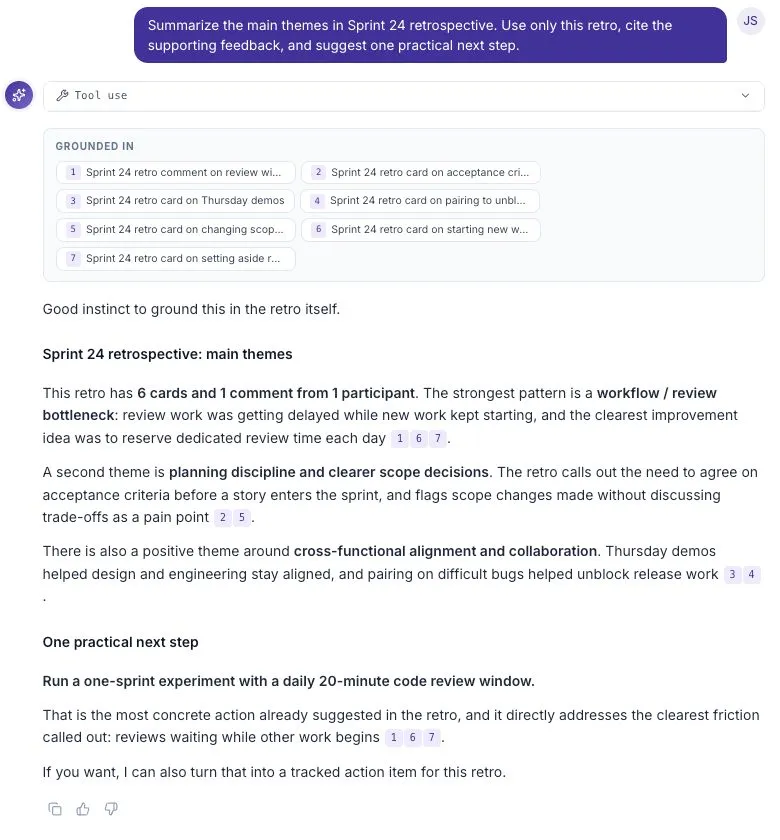
This example uses a fictional six-card retrospective. The answer states the sample size and links its themes to supporting feedback.
A good first question
Section titled “A good first question”Open Ask from the sidebar, or select Open in Ask from a closed retro’s summary. Choose the feedback you want to use, then ask a specific question:
What are the main blockers in this feedback? Cite the evidence for each one.
Other useful questions include:
- What did people say worked well?
- Where do the answers disagree?
- What changed between these two surveys?
- What is one small improvement we could try next?
Ask can return prose, source citations, tables, and charts depending on the question and available data. A chart is not needed for every answer.
Choose what Ask should read
Section titled “Choose what Ask should read”The Grounded in bar shows the sources selected for the thread. Use Add source to find a survey or closed retrospective. With no specific source selected, Ask can use feedback across the workspace.
For a question about one sprint, select that sprint’s feedback first. Otherwise unrelated feedback may affect the answer. See Grounding a thread for the steps.
Check the evidence
Section titled “Check the evidence”An answer may include a Grounded in panel and numbered citations. Use them to identify which feedback supports a statement. Some source chips provide a direct detail view; others only identify the source.
Before sharing a conclusion, check:
- Does the source cover the team and time period you intended?
- Does the original feedback support the summary?
- How many people contributed?
- Are there examples that disagree with the main theme?
A small sample can highlight a concern, but it does not establish what everyone thinks. If the evidence is incomplete, ask a follow-up or collect more feedback.
Keep a conversation going
Section titled “Keep a conversation going”A conversation is saved as an Ask Thread. Ask follow-up questions in the same thread when you want to continue exploring the same topic. Start a New thread when the topic changes.
The Threads panel lets you search, rename, and pin your conversations. A useful title, such as “Sprint 24 — themes and next steps,” is easier to find later than a long first question.
Understand usage
Section titled “Understand usage”Each query uses the workspace’s shared Ask Pool. The remaining balance appears in the thread header. Existing threads remain readable when new queries are unavailable.
See The Ask Pool and usage for allowances and limits.
Next steps
Section titled “Next steps”- Grounding a thread — select the feedback for your question.
- Threads and pinning — organize ongoing work.
- Ask Artifacts — understand charts, tables, citations, and other answer elements.
- Turn feedback into a next step — check the evidence and agree on an action.