

Grounding a thread
Choose which surveys or closed retrospectives Ask should use when answering your questions.
Grounding means choosing the sources for an Ask Thread. Use it when you want an answer about a particular survey or retrospective rather than all workspace feedback.
Choose sources before asking
Section titled “Choose sources before asking”- Open Ask or start a New thread.
- Open the source picker in the bar below the thread header.
- Search for a survey or closed retro by title.
- Select the source. You can select more than one.
- Select Done.
- Check the source chips, then send your question.
You can choose sources before the first question. The current app carries that selection into the new thread when it is created.
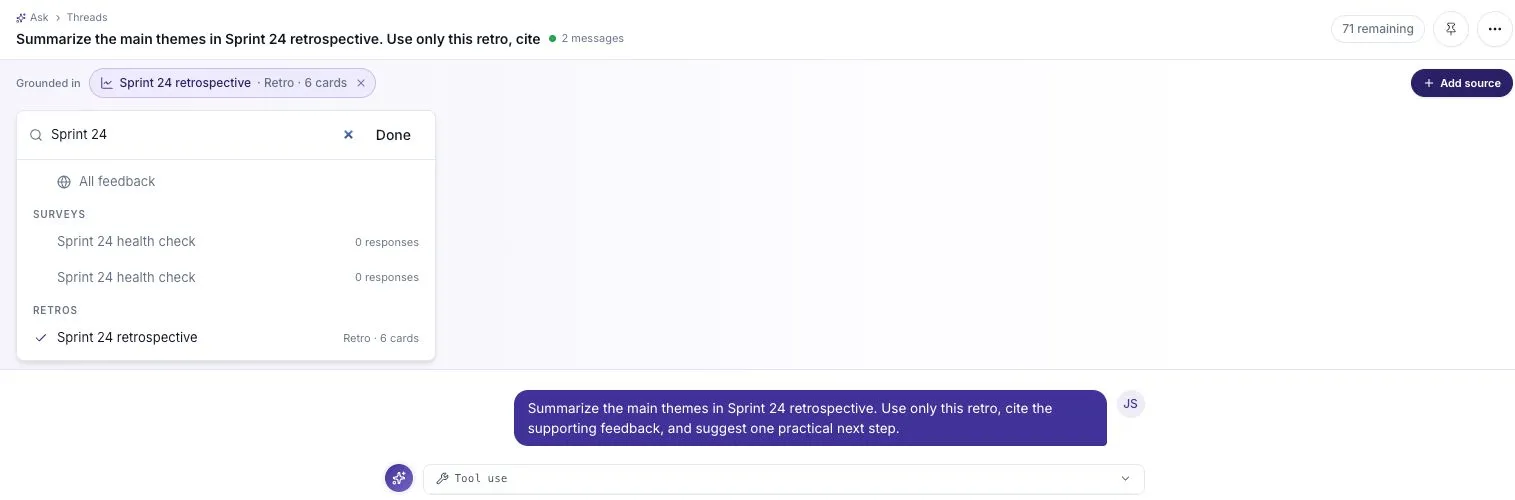
The selected retrospective appears in the Grounded in bar. Search results also show the amount of feedback in each source.
Start from a retrospective
Section titled “Start from a retrospective”Open a closed retro’s summary and select Open in Ask. The new conversation starts with that retro selected as a source.
For example, ask: “Summarize this retro’s main themes and cite the feedback behind each one.” Check that the retro’s title is still shown in the scope bar before sending.
Only closed retros can be used as feedback sources. If a retro is reopened, close it again before relying on it in Ask.
Compare sources
Section titled “Compare sources”Select the sources you want to compare, then name the comparison clearly in your question. For example: “Compare the blockers in these two sprint surveys. What improved, and what is still unresolved?”
Check the amount of feedback in each source. A difference between two surveys may reflect a different audience or fewer responses, not a change in the team’s experience.
Remove a source
Section titled “Remove a source”Select the × on a source chip to remove it. To return to workspace-wide feedback, open the picker and select All feedback.
Changing the sources affects later questions. It does not rewrite answers already saved in the thread. Check the source bar whenever you switch topics.
Use mentions carefully
Section titled “Use mentions carefully”Typing @ in the question box opens source suggestions. A mention helps point a question at something specific, but the scope bar is the place to check the thread’s selected sources.
If an answer seems to use the wrong feedback, check the scope first, then ask again with a clear source and time period.
If a source is missing
Section titled “If a source is missing”- Search for a distinctive part of the title.
- Check that you are in the correct workspace.
- For retros, confirm that the board is closed.
- Confirm that you have access to the feedback.
An empty source cannot support a useful summary. Collect responses or add feedback before asking it to explain a pattern.