

Create an Agent Survey
Prepare the goal, topics, and boundaries for an AI interview, then review the conversations participants complete.
An Agent Survey interviews each participant based on a brief you prepare. It can follow up on an answer instead of giving everyone the same fixed questions.
Use it when you need examples and context: why a handoff is difficult, how people work around a problem, or what would make a process easier.
Before you start
Section titled “Before you start”Agent Surveys use the workspace’s monthly allowance or available credits. Free workspaces can try them with signup credits. Check Billing if creation is unavailable.
Decide what you want to learn, who should answer, and how much time to ask for. For a quick team check, choose one focused goal.
Start the Design interview
Section titled “Start the Design interview”- Open Surveys and select New survey.
- Choose Agent survey, then Continue with Agent.
- Give the survey a clear name.
- Tell the design agent your goal and audience.
- Review the brief and coverage on the right as the conversation develops.
For example:
Learn what slowed code reviews during the last two sprints. Ask our product and engineering team for concrete examples and one improvement. Keep it to five minutes. Do not ask people to name or rate coworkers.
The Agent Survey Brief holds the goal, audience, tone, and off-limits topics. Participants do not see this brief; it guides their interview.
Review the coverage
Section titled “Review the coverage”Coverage controls the topics and boundaries of the conversation. You can edit the visible fields directly.
| Field | What to check |
|---|---|
| Opening prompt | A clear first question that the audience can answer |
| Topics | The areas you need to understand, with a reason each matters |
| Priority | Whether a topic must be covered, should be covered, or can come up naturally |
| Probe depth | How much follow-up a topic needs: light, standard, or deep |
| Guardrails | Subjects or behavior the agent should avoid |
| Closing prompt | The final question or wrap-up |
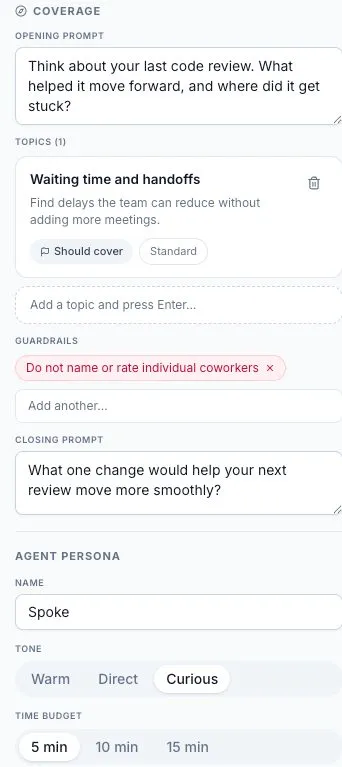
Start with a few related topics. A short interview with ten must-cover topics leaves little time for useful follow-up. Priorities guide the interview; they do not guarantee that every participant will answer every topic.
Set the interviewer and time budget
Section titled “Set the interviewer and time budget”The Agent Persona is the name and tone participants meet. The default name is Spoke. Choose Warm, Direct, or Curious, and a time budget of 5, 10, or 15 minutes.
Check Anonymous responses and the workspace’s plan before sharing. Explain the actual collection settings to participants; do not promise anonymity just because the survey uses an AI interviewer.
Review and send
Section titled “Review and send”The builder needs a goal, audience, opening prompt, and at least one topic before Continue becomes available. Review the design, then continue to the send settings.
Use Share a survey for links, email, scheduling, and embed options. Review the published state before sending the link to your audience.
If the design does not progress
Section titled “If the design does not progress”If the agent stops responding and the brief stays empty, keep your original goal in a separate note. Check the saved state and reload the draft before trying again. Do not assume an unanswered message has filled in the required fields.
If Continue remains disabled, check the required brief and coverage fields. For an urgent fixed-question check, you can create a Static Survey while the Agent Survey issue is investigated.
Read the answers
Section titled “Read the answers”Open responses and transcripts to read each conversation in context. The results page develops a brief as responses arrive. An early or tentative brief reflects limited feedback. Check the response count and use the controls shown on the page to refresh or re-run available analysis. See feedback summaries for the difference between Static and Agent briefs.
Review the source quotes and the number of participants behind a theme. A polished summary can still reflect a small or incomplete sample.