

Closing a retro
End the session, read the summary, export the board, run the format again — and reopen a closed retro if you are a workspace admin.
Closing freezes the board and turns the retro into a record. Nothing is deleted and nothing is archived — everything stays readable, just not editable.
End the retro
Section titled “End the retro”- Select Finish & summarize in the dock — or End retro, which is always available there regardless of phase.
- Check the confirmation. It shows the session’s tallies (cards, votes, comments, people) and states that the board becomes read-only for everyone.
- Select End retro.
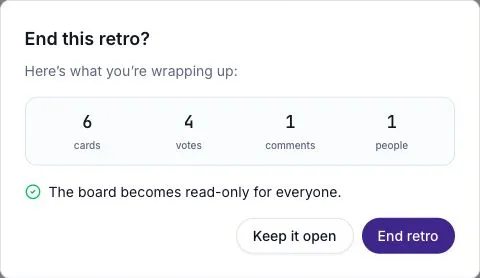
Every open client freezes at once. Participants get a read-only banner on the board with a View summary action; nobody sees an add-card box, a vote control, or a comment composer again.
On a guided board, the dock’s primary action becomes Finish & summarize only once no un-discussed card remains in the Review list. On a Live board it reads End retro throughout.
Read the summary
Section titled “Read the summary”A closed retro’s default destination is its Summary — opening it from the Retros list, or from a board link, lands you there.
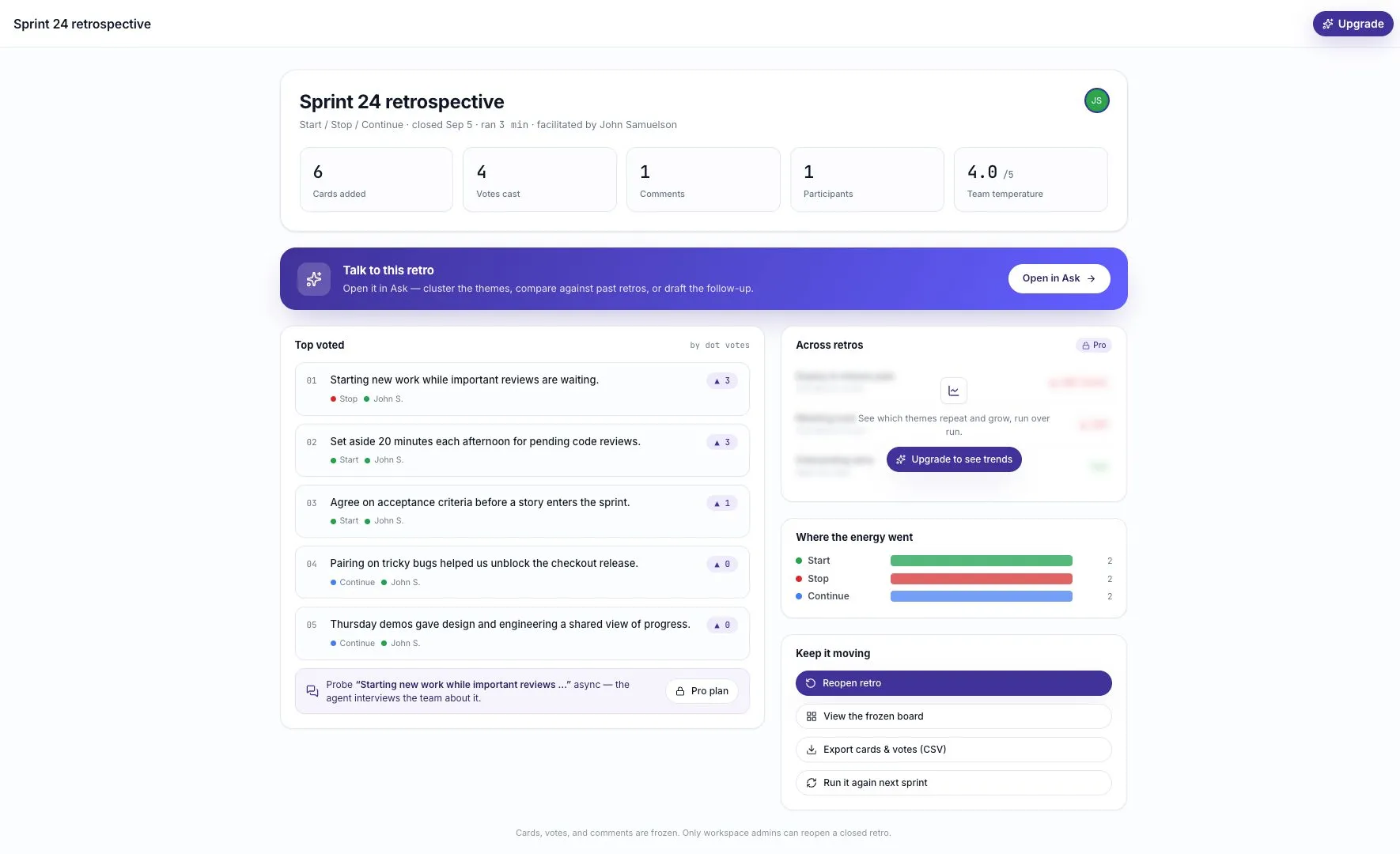
| Panel | What it shows |
|---|---|
| Header | Title, format, close date, run duration, facilitator, and who was there |
| Stats | Cards added, votes cast, comments, participants, and team temperature out of 5 |
| Top voted | Every card ranked by dot votes, with its column, author, and comment count |
| Where the energy went | A bar per column, scaled against the busiest one |
| Across retros | Which themes are repeating and growing, run over run — a paid capability |
| Keep it moving | Reopen, frozen board, CSV export, run it again |
Team temperature shows an em dash rather than a zero when nobody answered. See Moods and temperature checks.
Take the board away with you
Section titled “Take the board away with you”Export cards & votes (CSV) downloads one row per card — its column, its text, its author, its vote count, and its comment count — ordered by column and then by the card’s position on the board.
On an anonymous board the author column reads Anonymous; no participant identifier is ever written to the file.
Look at the frozen board
Section titled “Look at the frozen board”View the frozen board opens the board itself, laid out as it was, with editing disabled. Useful when the summary’s ranking isn’t the shape you need — for reading a single column in full, for instance.
Run the format again
Section titled “Run the format again”Run it again next sprint takes you to the create flow with this retro’s format already chosen, so you only have to name the new board.
Boards migrated from the older ScatterSpoke may have no format on record. Those skip straight to the templates gallery for you to pick one.
Can a board be deleted?
Section titled “Can a board be deleted?”No. There is no delete control on a retro board, active or closed — closing is the end of a board’s lifecycle, and as above, closing keeps everything readable. A board created by mistake is best closed and left; it costs nothing and drops out of the active list.
Reopen a closed retro
Section titled “Reopen a closed retro”Only workspace admins can reopen a closed retro. Other workspace members can read the closed retro but cannot reopen it.
An admin selects Reopen retro from the summary’s Keep it moving panel, or from the banner on the frozen board. The retro goes live again for everyone with the phase, cards, votes, and comments it had, and the board becomes the default destination again.
Reopen when the session was ended by accident or genuinely wasn’t finished. For a follow-up conversation, Run it again is the better tool — a reopened retro overwrites its own record, and you lose the closed reading of what the team said at the time.
Ask about it afterwards
Section titled “Ask about it afterwards”A closed retro carries an Open in Ask action that opens Ask grounded on that board — for comparing it against past runs, or drafting the follow-up.
On a paid plan, the summary’s Probe deeper row also offers to draft an Agent Survey that interviews the team about the top-voted card, asynchronously. The draft lands under Surveys for you to review; nothing is sent on your behalf.