

Private feedback and anonymity
Two independent board settings — hiding feedback until the facilitator reveals it, and hiding who wrote what — and how each is enforced.
Retro privacy has two separate controls:
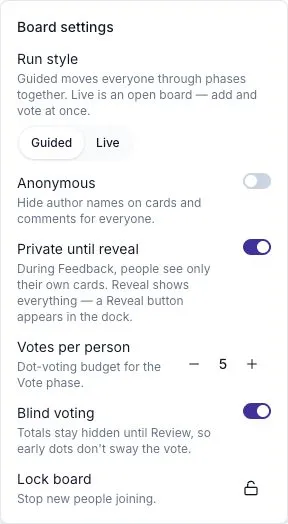
- Private until reveal controls when participants can read each other’s cards.
- Anonymous controls whether author names appear on cards and comments.
Open Settings in the facilitator dock. Explain the settings before people start writing.
Private until reveal
Section titled “Private until reveal”This is on by default for a new guided board. People can read their own cards; other participants’ cards appear as Feedback hidden until reveal until the facilitator reveals them.
Use it to give everyone time to think independently. When writing is finished, select Reveal or move into Group. Revealing the cards is one-way for that session.
A Live board is always visible. It does not use the guided reveal step.
Anonymous feedback
Section titled “Anonymous feedback”Anonymity is off by default. When on, card and comment authors appear as Anonymous in the board and summary.
The presence row can still show who attended, and facilitator actions still identify who moved the session forward. The text people write can also reveal who they are. Ask participants to avoid identifying details if those would undermine the privacy they expect.
Choose anonymity when it helps people speak candidly. You can still discuss a card with the group, but do not pressure its author to identify themselves.
Access settings can change the options
Section titled “Access settings can change the options”| Access mode | Privacy choices |
|---|---|
| One team or the workspace | Choose anonymity and private-until-reveal settings |
| Link with email required | Choose anonymity and private-until-reveal settings |
| Link with no sign-in | Anonymous and always visible; the two settings are locked |
See Inviting participants and guest links for the access options.
Blind voting is separate
Section titled “Blind voting is separate”Blind voting hides vote totals until Review, helping people choose without following the current leader. It does not make the feedback text anonymous. See The Vote phase.
After the retro closes
Section titled “After the retro closes”The frozen board and summary retain the session’s privacy settings. An anonymous board’s CSV export uses Anonymous for card authors.
The temperature check is shown as an average and number of responses. Treat all exports and quotes according to the audience that was agreed for the session.