

Timer and votes
Start a shared countdown, choose the right vote budget, and adjust both mid-session from the facilitator dock.
Both controls live in the facilitator dock at the bottom of the board, and both are visible only to the facilitator. Their effects are visible to everyone.
Start a timer
Section titled “Start a timer”- Select Timer in the dock.
- Pick a preset: 3 min, 5 min, 10 min, or 15 min.
The countdown appears immediately in every participant’s top bar. It ticks from the moment you started it, so everyone sees the same remaining time — including someone who joins halfway through.
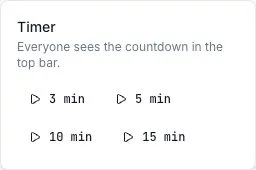
Under the last minute the chip turns red. At zero it changes to Time’s up with a struck-through timer icon, and screen readers are told once.
The timer never does anything else. It does not advance the phase, lock the board, or stop anyone typing — expiry is a signal to the room, and what happens next is your call.
Stop or restart
Section titled “Stop or restart”Select Timer again while one is running, then Stop. The chip disappears for everyone.
To change the length mid-run, stop the current timer and start a new one. There’s no extend action; a running timer’s duration is fixed.
Set the vote budget
Section titled “Set the vote budget”- Select Settings in the dock.
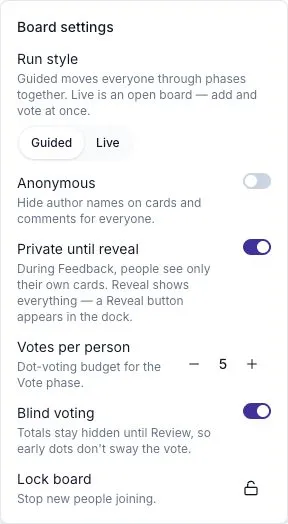
- Use the − and + controls next to Votes per person.
The range is 0 to 99, and the default on a new board is 5. Each step saves immediately and reaches every participant.
Choosing a number
Section titled “Choosing a number”Roughly a third of the number of distinct issues on the board, rounded down. In practice:
| Board | Budget |
|---|---|
| Under 15 cards | 3 |
| 15–25 cards | 5 |
| Over 25 cards | 7, or cluster first |
Cluster before raising the budget. A big number on a duplicate-heavy board buys you ties, not clarity — see AI theme clustering.
Changing it mid-vote
Section titled “Changing it mid-vote”Raising the budget gives everyone more votes to spend right away, including people who have already spent out.
Lowering it does not retract votes already cast. Someone who spent five before you lowered the budget to three keeps their five on the board; they simply have nothing left. If the number was clearly wrong, say so out loud rather than quietly correcting it — the totals are already skewed towards whoever voted first.
Resetting votes
Section titled “Resetting votes”There is no control that zeroes a card’s votes or wipes the board’s tally — not for the facilitator, not for anyone. The only way votes come off a card is each voter taking back their own with the un-vote control. If a round needs a genuine do-over, ask people to un-vote, or run the conversation again on a fresh board with Run it again.
Setting a budget of zero
Section titled “Setting a budget of zero”Setting Votes per person to 0 removes voting from the session: nobody can cast, and the budget pill disappears.
This turns the Review list into a plain board-order list rather than a ranked one, so it’s only sensible when the board is small enough to work through completely, or when the discussion order is being decided some other way.
Blind voting
Section titled “Blind voting”The Blind voting switch in Settings is on by default. It keeps totals hidden until Review. Participants still see their own remaining budget and can select I’m done voting. This setting is separate from anonymity.
What participants see
Section titled “What participants see”| Control | Facilitator | Participant |
|---|---|---|
| Timer presets / Stop | Yes | No |
| Running countdown | Yes | Yes |
| Votes-per-person stepper | Yes | No |
| Remaining-budget pill | Yes | Yes |
| Vote and un-vote controls on cards | Yes | Yes |
The budget pill is shown only while votes can be cast — the Vote phase on a guided board, any time on a Live board — and never on a closed board.