

Seats and capacity
Check available seats, understand pending invitations, and resolve a full workspace or a change in plan access.
Seats are for people who enter the workspace to create surveys, facilitate retros, or review feedback. Survey Participants do not use paid seats.
Check your seat capacity
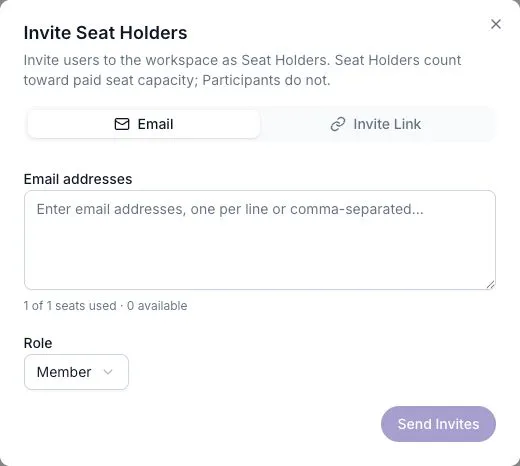
Section titled “Check your seat capacity”Open Settings → Users and select Invite Seat Holder. The invitation dialog shows used, reserved, and available seats.
| Plan | Seat range |
|---|---|
| Free | 1 |
| Pro | 1–5 |
| Business | 5–250; the first five are included in the base plan |
| Enterprise | No fixed maximum |
Seat Capacity is the number of Seat Holders your workspace can currently have. Pro and Business capacity follows the seat quantity on the subscription.
Account for pending invitations
Section titled “Account for pending invitations”Available seats are capacity minus current Seat Holders and pending invitations. Sending an invitation reserves a seat before the person accepts it.
Inviting a Participant to enter the workspace is a Seat Conversion. That person now uses a seat; simply answering a survey does not cause a conversion.
Adding an existing Seat Holder to another team does not use another workspace seat. See Invite users and seats for invitation steps.
If the workspace is full
Section titled “If the workspace is full”Review pending invitations and current members first. If everyone still needs access, an administrator can increase seats within the plan’s range or choose a larger plan in Billing.
A workspace can be Over Seat Capacity after a downgrade. Existing Seat Holders keep access to the features available on the current effective plan. New invitations and conversions are blocked until there is room.
Understand plan status
Section titled “Understand plan status”Your Plan Tier is the plan on the subscription. Your Effective Tier is the feature access available right now.
| Subscription situation | Effective access |
|---|---|
| Healthy paid subscription | The paid plan |
| Past-due payment being resolved | Paid access remains available during recovery |
| Cancellation scheduled, paid period still running | Paid access until the period ends |
| Canceled, incomplete, or unpaid subscription | Free capabilities |
Check Settings → Billing if a paid feature stops working. The subscription’s name alone may not explain its current access.
Resolving the billing issue can restore paid capabilities. Plan changes do not by themselves delete your surveys and responses. Your separate data retention policy still matters.
Change seats
Section titled “Change seats”Use the Seats card in Billing on Pro or Business, then review and confirm the proposed charge. Read Managing billing for the full flow.