

Plans and tiers
Compare seats, teams, AI allowances, and key features across the four plans.
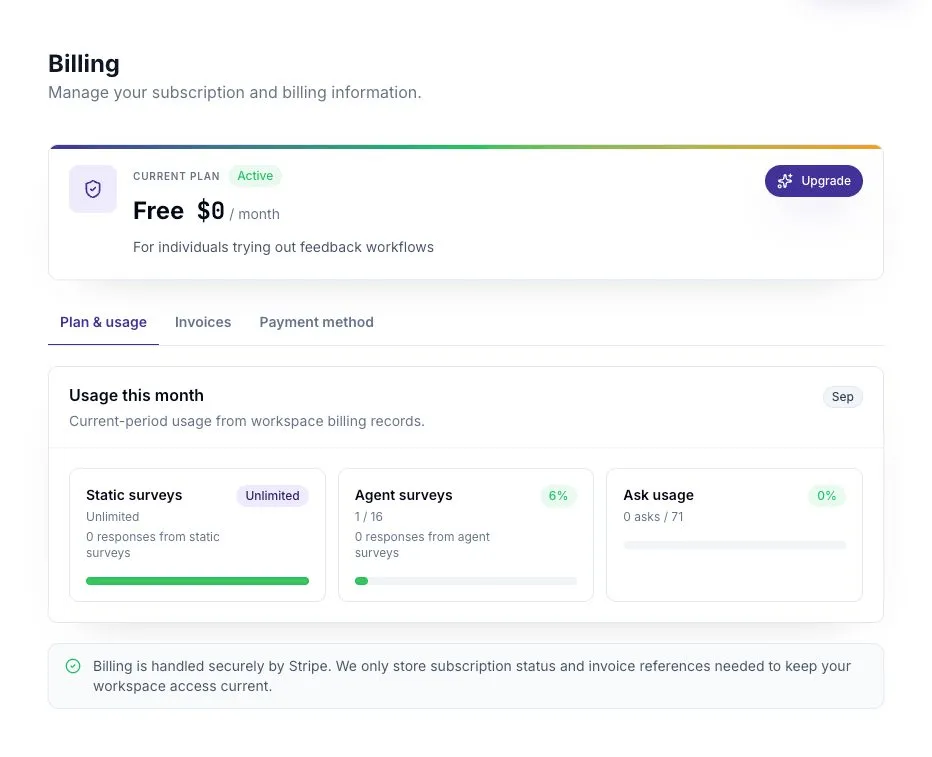
ScatterSpoke has four plans: Free, Pro, Business, and Enterprise. Open Settings → Billing to see your workspace’s plan, available usage, and the price of a change before confirming it.
Compare the plans
Section titled “Compare the plans”| Free | Pro | Business | Enterprise | |
|---|---|---|---|---|
| Seats | 1 | 1–5 | 5–250 | Custom, no upper limit |
| Teams | 1 | 2 | Unlimited | Unlimited |
| Static Surveys and responses | Unlimited | Unlimited | Unlimited | Unlimited |
| Agent Surveys per month | Signup credits only | 20 | 150 | Unlimited |
| Ask Queries per month | Signup credits only | 250 | 2,000 | 5,000 |
| Anonymous survey responses | — | Included | Included | Included |
| Custom branding, domain, and email | — | Included | Included | Included |
| AI retrospective features | — | Included | Included | Included |
| Groups and custom roles | — | — | Included | Included |
| API access | — | — | Included | Included |
| SAML SSO | — | — | Paid add-on | Included |
| Audit log access | — | — | — | Included |
Monthly allowances belong to the workspace. Adding seats does not multiply them. New Free workspaces receive one-time credits for 10 Agent Surveys and 50 Ask Queries; those credits do not expire.
Choose a plan for the work you need
Section titled “Choose a plan for the work you need”- Free: one person collecting feedback with Static Surveys and trying the AI tools with signup credits.
- Pro: a small team that needs recurring AI usage, anonymous surveys, branding, or AI retro features.
- Business: a larger workspace that needs more teams, groups, custom roles, shared templates, or API access.
- Enterprise: a workspace that needs Enterprise access controls, audit logs, and a custom agreement.
Pro and Business offer self-service billing. Enterprise uses a sales conversation. Check the current quote in Billing for prices and available billing intervals.
Understand AI credits
Section titled “Understand AI credits”Agent Surveys and Ask have separate usage pools. Monthly allowance is used first, followed by non-expiring credits. Free workspaces can create Agent Surveys while they have credits even though they have no monthly allowance.
Additional packs provide 50 Agent Surveys or 250 Ask Queries. Review the amount and purchase details in Billing before buying. See Usage Credits and the Ask Pool.
Check access when a feature is unavailable
Section titled “Check access when a feature is unavailable”A role and a plan solve different problems. You may need admin access to change a setting even when your plan includes it. A role also cannot unlock something your plan excludes.
If paid access changes unexpectedly, check the subscription status and payment method in Billing. Your effective feature access can differ from the plan name shown on an inactive subscription.
Change plans or seats
Section titled “Change plans or seats”Read Managing billing before changing the subscription, and Seats and capacity before adding people.
A team limit affects creation of new teams. Existing teams can remain after a downgrade. Similarly, an over-capacity workspace keeps existing Seat Holders but cannot add new ones until capacity is available.