

Your first survey
Create a two-question team survey, test the participant link, and learn where to find the answers.
This lesson ends with a published survey and a link you can actually send. You need a workspace — if you don’t have one yet, getting started with ScatterSpoke creates one step by step.
We’re building a Static Survey: you write the questions, everyone answers the same ones. It’s the kind that’s unlimited on every plan, and it’s the right thing to learn on because you can review every question before publishing.
We’ll ask a team two questions about their last sprint.
Step 1 — Start a new survey
Section titled “Step 1 — Start a new survey”Open Surveys in the sidebar and choose New survey, top right.
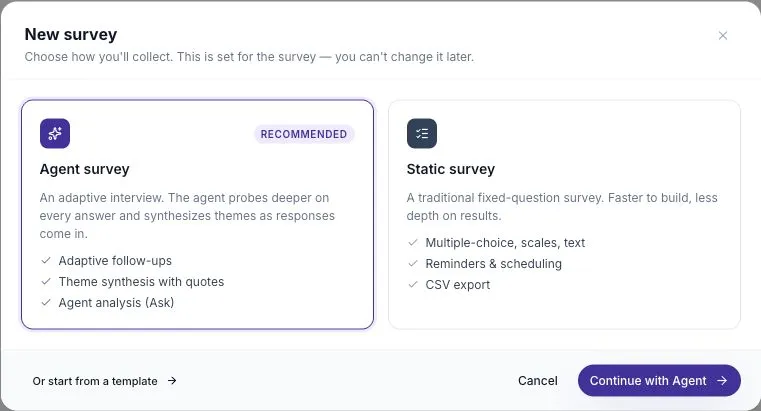
A modal offers two cards. Select the Static survey card, then choose Continue with Static at the bottom.
ScatterSpoke creates a draft called Untitled survey and drops you into the builder.
Step 2 — Read the step strip
Section titled “Step 2 — Read the step strip”Look along the top. There’s a pill reading Static survey, then three steps:
Setup → Questions → Send
That’s the whole shape of the builder. You’re on Setup. The button at the right advances you, and it stays disabled until the current step is complete — when it’s disabled, the strip tells you exactly what’s missing.
Step 3 — Set the survey up
Section titled “Step 3 — Set the survey up”Enter the survey details, then review the three collection settings.
- In Survey name, replace Untitled survey with
Sprint 24 health check. - In Audience description, write
Product and engineering team. This is a note to yourself — it doesn’t restrict who can answer. - Under estimated time, choose a short duration, such as 3 minutes. Check the participant welcome page before sharing so the time you promise matches the experience.
For this example, leave Anonymous responses, Allow partial submissions, and AI follow-up questions off. Anonymous responses and AI follow-ups require a paid plan. Tell the team that this example does not collect anonymous responses.
Choose Continue.
Step 4 — Write the questions
Section titled “Step 4 — Write the questions”You’re on Questions, and one placeholder question is already waiting — a survey can’t exist without at least one.
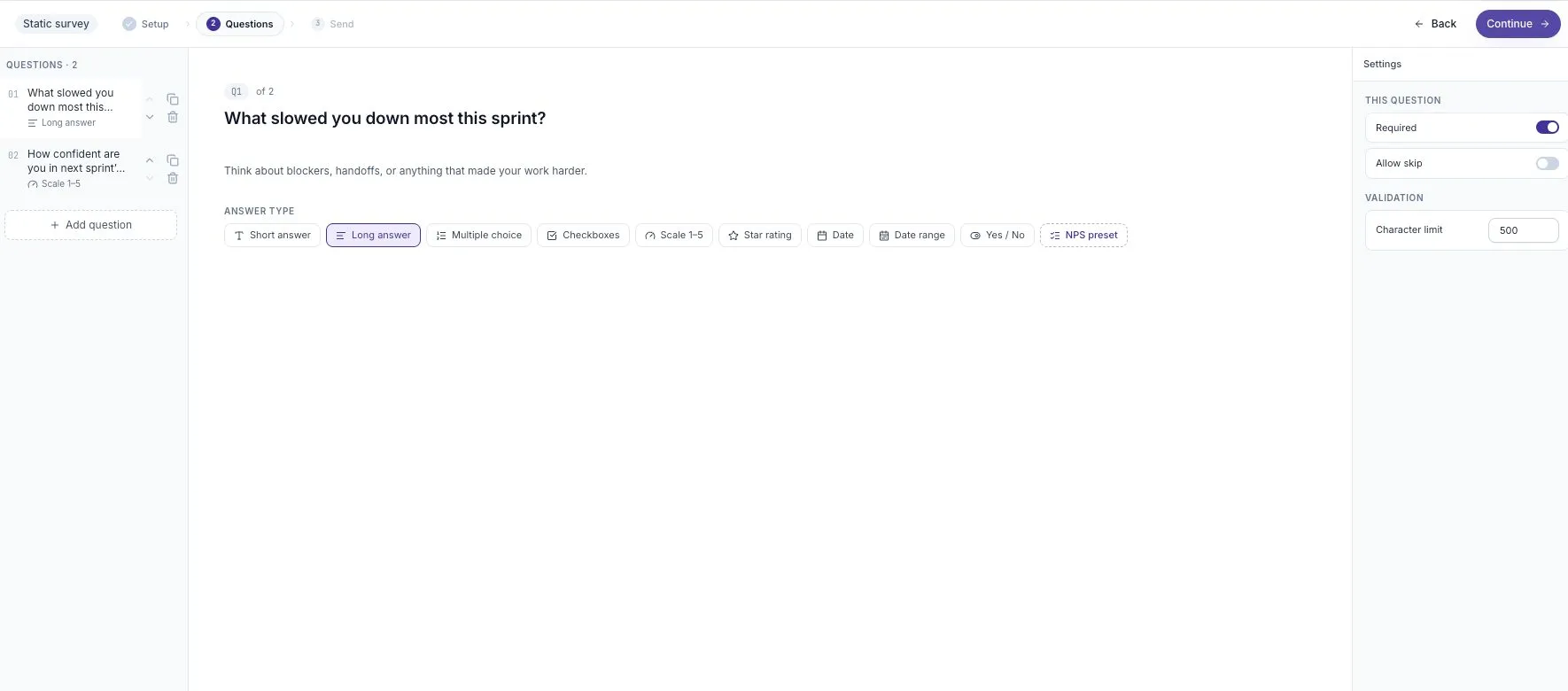
Edit the question that’s there:
- Replace its text with
What slowed you down most this sprint? - From the answer-type chips, choose Long answer. You want people to actually explain.
Add a second question:
- Add a question and give it the text
How confident are you in next sprint's plan? - Choose the Scale 1–5 chip.
Two questions is enough for this lesson, for this first check-in. The chips also offer short answer, multiple choice, checkboxes, star rating, date, date range, and yes/no — see question types when you want them.
Choose Continue.
Step 5 — Review and publish
Section titled “Step 5 — Review and publish”The Send step opens on a review headed Review & publish. Nothing is live yet.
Across the top are four figures: how many questions, the estimated time, how many are required, and whether responses will be identified or anonymous. Below them, every question is listed in order — this is your last read-through before other people see it.
Check the wording, answer types, and required settings. Publishing locks the questions; later changes need a duplicate survey. Then choose Publish.
Step 6 — Copy your link
Section titled “Step 6 — Copy your link”The same screen you just published from becomes the share surface. The sharing controls appear in the Send step.
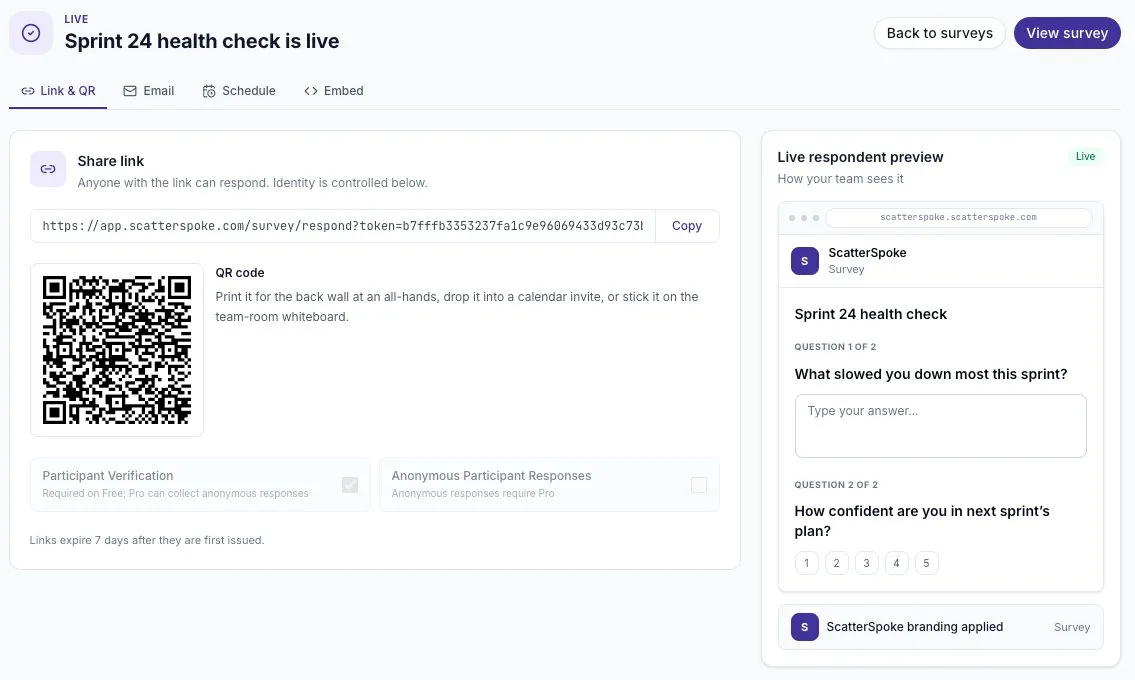
Four tabs appear: Link & QR, Email, Schedule, and Embed. You’re on Link & QR.
Choose Copy beside the share link. The button confirms with Copied.
That link opens your survey. Before sending it to the team, complete the check below.
Step 7 — Test the participant experience
Section titled “Step 7 — Test the participant experience”- Open the copied link in a separate tab.
- Check the title and the instructions. Complete email verification if prompted.
- Answer both questions and submit once. Use clearly marked example feedback if this is a practice survey.
- Return to Surveys, open the survey’s results page, and find your submitted response under Responses.
A published link alone is not a completed test. You should be able to find the submitted answers before asking the rest of the team to take part. If the welcome page or verification stops you, use the participant guide to resolve it first.
If you are testing a survey that will collect real feedback, keep track of the test response so it is not mistaken for team feedback during analysis.
You can now share the link with a short message:
Please complete our sprint health check by Thursday. It has two questions. Responses are identified. We’ll review the feedback on Friday and choose one improvement for next sprint.
What you’ve done
Section titled “What you’ve done”You have a two-question Static Survey and a share link. Once the test response appears in the results, you have checked the full path from invitation to answer.
When team answers arrive, read the questions and answers together. Choose one useful next step and tell the team what will happen next. See turn feedback into a next step.
Where to go from here:
- Responses and transcripts — reading what comes back
- Distribution — email invites, scheduling, reminders, and embedding
- Agent Surveys — the other kind, where the AI writes the questions
- Templates — start from a prepared survey next time