

Retrospective best practices
What separates a retro that changes something from one that fills an hour — timing, safety, scope, and knowing when to stop.
A useful retro ends with a small improvement the team can try and a plan to check whether it helped. These habits keep the session focused and make participation worthwhile.
Start with a clear purpose
Section titled “Start with a clear purpose”Name the period or event you are reviewing: the last sprint, a release, or an incident. Tell people what is in scope before they write.
Choose a format that fits. Start / Stop / Continue works for everyday improvements. A focused incident format helps a team discuss a specific event.
Make space for independent feedback
Section titled “Make space for independent feedback”Give people a few quiet minutes to add cards. Private until reveal helps prevent the first visible idea from shaping every answer.
Ask for concrete examples: “Reviews waited a day because nobody knew who owned them” is easier to work with than “Communication is bad.” Keep one idea per card.
If you collect feedback throughout the sprint, explain whether the board stays visible and when the team will review it.
Agree on privacy
Section titled “Agree on privacy”Explain anonymity and reveal settings before writing starts. Choose the settings that fit your team and the topic. Do not change expectations halfway through.
Focus discussion on work and conditions, not on guessing who wrote a card.
Group before voting
Section titled “Group before voting”Use the Group phase to bring related cards together. Read the proposed grouping with the team and keep distinct concerns separate.
Manual grouping is available on every plan. AI grouping can help where the workspace has access, but the team should review its suggestions.
Use votes to choose a starting point
Section titled “Use votes to choose a starting point”Give everyone the same vote budget. Blind voting helps people choose independently.
Start discussion with the highest-priority topics, but leave room for a serious concern that received few votes. Voting is a way to organize attention, not a reason to dismiss someone’s experience.
Leave time for a decision
Section titled “Leave time for a decision”Reserve enough time to discuss one or two improvements. If a topic is too large, identify the next investigation instead of trying to solve everything in the room.
Use a timebox when it helps the group stay focused, and agree before extending it. The facilitator can keep the discussion moving without cutting off useful context.
Write a specific next step
Section titled “Write a specific next step”Record the decision in the relevant card or group’s comment thread. Include an owner, a small action, and a review date.
Try a 20-minute code review window each afternoon for one sprint. John will coordinate it. At the next retro, check whether reviews spent less time waiting.
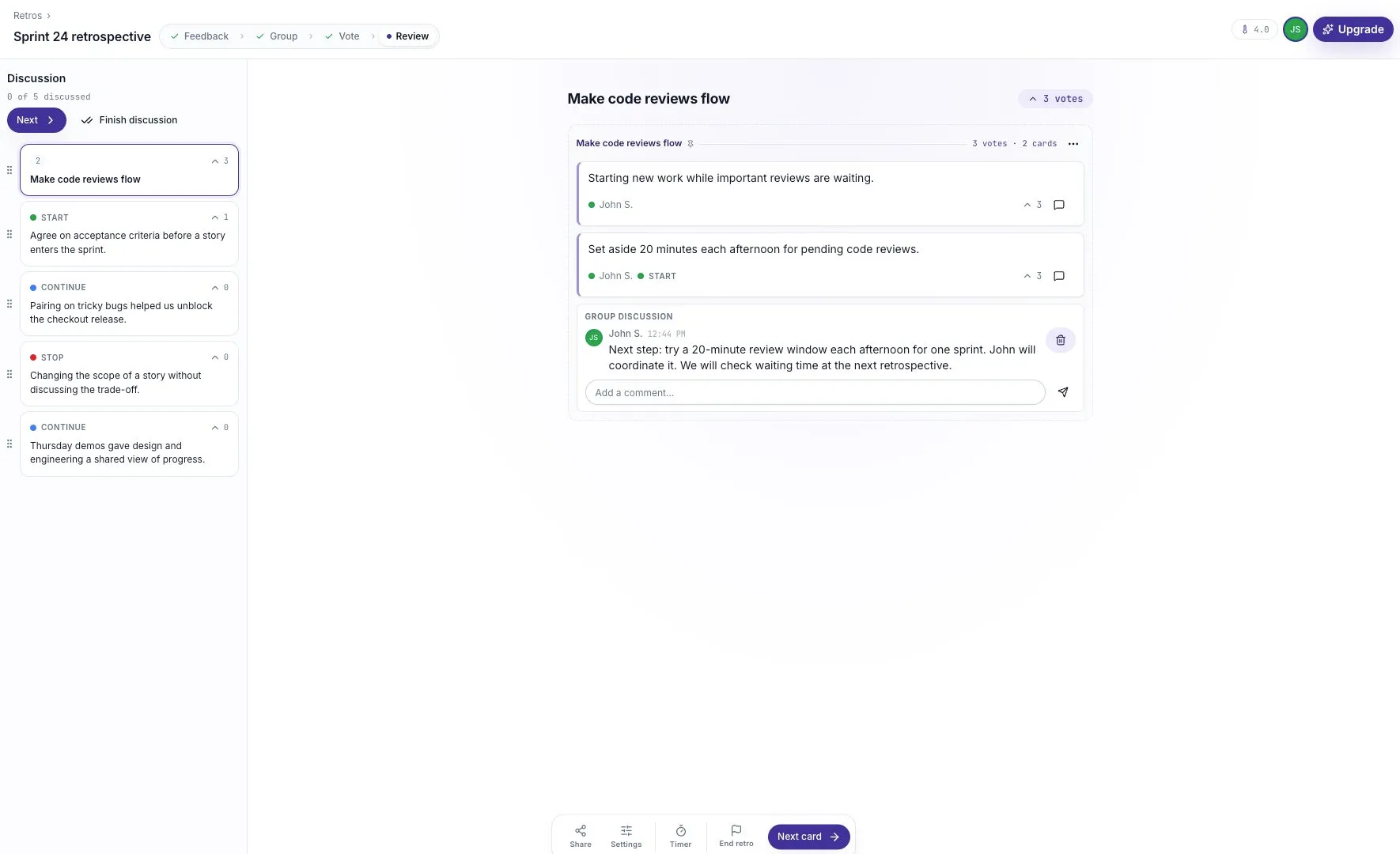
The app does not record what the team says aloud. Write down what someone reading the board later will need to know.
Start the next retro with the previous action
Section titled “Start the next retro with the previous action”Open the earlier summary and check what happened. Did the team try the change? What helped? What should change next?
A change that did not work is still useful evidence. Explain the result and choose the next experiment rather than quietly repeating the same action.
Use the temperature check as context
Section titled “Use the temperature check as context”Look at the number of responses and changes across sessions. Do not treat one average as a complete measure of team health or turn it into a performance target.
If the number changes, invite discussion without asking individuals to explain their score.
For the complete facilitation flow, use Running a retro.