Surveys overview
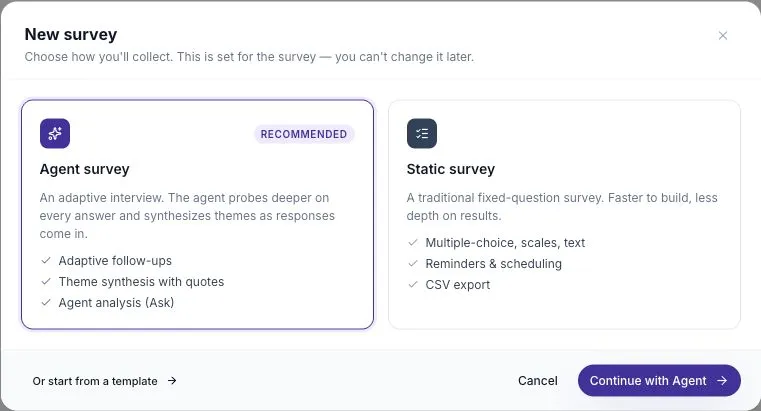
ScatterSpoke collects feedback through two kinds of survey — Static Surveys you author yourself, and Agent Surveys where an AI interviews each participant adaptively.
A survey is how you collect feedback in ScatterSpoke. There are two kinds, and the difference is who decides what gets asked.
Static Surveys
Section titled “Static Surveys”A Static Survey is a traditional survey: you write a fixed set of questions, and every participant answers the same ones. You control the wording, the answer types, and the order.
Static Surveys are unlimited on every plan, including Free.
Use one when you already know what you need to ask — a pulse check, a post-release survey, a standing weekly question set.
Agent Surveys
Section titled “Agent Surveys”In an Agent Survey, you guide an interviewer with a goal, topics, and boundaries:
- Prepare an Agent Survey Brief with the design agent and review the editable coverage fields.
- The AI then interviews each participant turn by turn, adapting to where their answers lead.
Two participants can be asked entirely different follow-up questions, because the agent probes what each person actually said.
Agent Surveys use your workspace’s monthly allowance or available credits. Free workspaces can try them with signup credits.
Choosing between them
Section titled “Choosing between them”| Static Survey | Agent Survey | |
|---|---|---|
| Who writes the questions | You | The AI, guided by your brief |
| Every participant sees | The same questions | A conversation shaped by their answers |
| Best for | Known questions, trend tracking, quotas | Open exploration, “why” behind a signal |
| Plans | All, including Free | Available credits and plan limits apply |
| Comparable across runs | Yes — see Recurring Survey Series | Compare themes carefully; follow-up questions can differ |
If you’re not sure, start with a Static Survey. You can always run an Agent Survey afterwards to explore something the answers surfaced.
What both share
Section titled “What both share”Whichever kind you run, the rest of the system works the same way:
- Every response has a transcript — the ordered record of what was asked and how it was answered. Read it to check the context behind a summary.
- Links and responses have access limits. Sharing settings control link expiration and access. The survey must also be accepting responses.
- Participants don’t need an account. They answer through a link; no Seat Holder access is required. See the participant experience.
Where to go next
Section titled “Where to go next”- Create a Static Survey — the fastest way to get a survey out
- Question types — the answer formats available
- Agent Surveys — the Design interview and Coverage
- Distribution — links, email, QR, and embedding
- Templates — start from a prepared survey instead of a blank one